

◾️使用するAPIとキー
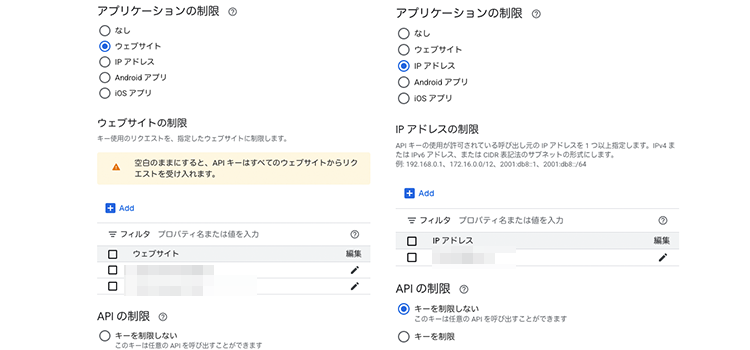
いままで使用してきた「アプリケーションの制限」→「ウェブサイト」ではない別のAPI キーを必要とします。
「認証情報の作成」から新しいキーを作ります。
出来上がったキーに「アプリケーションの制限」→「IPアドレス」を選択。すると、下に「IP アドレスの制限」を入力するエリアが出てくるので、対象のIPアドレスを入力します。

これで、ふたつのキーが生成されました。
・JavaScript用(フロント側・HTTPリファラ制限)
・PHP用(サーバー側・IPアドレス制限)
以下は東京駅周辺の「ドトール」というキーワードでPlaces API Web Serviceに問い合わせを実行しています。
◾️HTMLとJavaScript
<div id="map" style="width:100%; height:500px;"></div>

<script>
  let map;
  const center = { lat: 35.681236, lng: 139.767125 }; // 東京駅

  async function searchAndShowPlaces() {
    try {
      const response = await fetch('example.php', {
        method: 'POST',
        headers: { 'Content-Type': 'application/x-www-form-urlencoded' },
        body: `lat=${center.lat}&lng=${center.lng}`
      });

      const data = await response.json();

      if (!Array.isArray(data.results)) {
        console.error("places is not an array:", data);
        return;
      }

      data.results.forEach(place => {
        new google.maps.Marker({
          map,
          position: {
            lat: place.geometry.location.lat,
            lng: place.geometry.location.lng
          },
          title: place.name,
        });
      });
    } catch (error) {
      console.error("Error fetching places:", error);
    }
  }

  function initMap() {
    map = new google.maps.Map(document.getElementById("map"), {
      center,
      zoom: 15,
    });

    searchAndShowPlaces();
  }
</script>

<script src="https://maps.googleapis.com/maps/api/js?key=【フロント用APIキー】&libraries=places&callback=initMap" async defer></script>
◾️PHP(example.php)
<?php
$apiKey = '【サーバー用APIキー】';

$lat = $_POST['lat'] ?? null;
$lng = $_POST['lng'] ?? null;

if (!$lat || !$lng) {
  echo json_encode(['error' => 'Missing lat/lng']);
  exit;
}

$url = 'https://maps.googleapis.com/maps/api/place/nearbysearch/json?' . http_build_query([
  'location' => $lat . ',' . $lng,
  'radius' => 500,
  'keyword' => 'ドトール',
  'language' => 'ja',
  'key' => $apiKey
]);

$response = file_get_contents($url);
echo $response;
「Places API Web Service」が有効化されていることを Google Cloud Console で確認してください。
レスポンスに含まれる geometry.location を使ってマーカーを配置します。
今回は「東京駅の周辺にあるドトール店舗の表示」でしたが、他のキーワードでもいろいろと応用できます。
また、独自のデータベースを用意して、指定範囲内の緯度経度をマーカー表示することも可能です。お問い合わせください。